TECHNOMASTER
Thursday, September 10, 2015
How to take screenshot in lumia
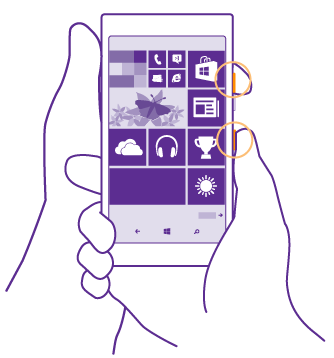
Press the volume up key and the power key at the same time.
To view or manage the screenshots you’ve taken, tap
Photos
>
albums
>
Screenshots
.
Change the volume
Personalise the start screen
View phot
os
No comments:
Post a Comment
Newer Post
Older Post
Home
Subscribe to:
Post Comments (Atom)

No comments:
Post a Comment